TL;DR:
- Missed calls can cost Australian small businesses tens of thousands of dollars annually, especially after hours.
- Implementing an AI voice receptionist requires proper setup, carrier confirmation, CRM integration, and compliance with upcoming laws.
Every missed call is a missed sale. For Australian small businesses, lost revenue from unanswered calls can reach tens of thousands of dollars annually, and that figure compounds fast when you factor in after-hours enquiries, peak-period overflow, and the reality that most callers simply ring a competitor rather than leave a voicemail. An AI voice receptionist for small business Australia is no longer a luxury reserved for large enterprises. This guide walks you through exactly how to plan, set up, integrate, and optimise one for your business, including what you need to know about Australia’s upcoming automated decision-making transparency laws.
Table of Contents
- Key takeaways
- AI voice receptionist for small business Australia: what you need before you start
- Setting up call forwarding and initial configuration
- Connecting your AI receptionist to your CRM
- How AI receptionists help small businesses across Australia
- Testing, monitoring, and staying compliant
- My take on getting this right
- How Bookeverycall helps you capture every call
- FAQ
Key takeaways
| Point | Details |
|---|---|
| Missed calls cost real money | Australian small businesses lose tens of thousands of dollars annually from unanswered calls, particularly after hours. |
| Preparation prevents problems | Confirm call forwarding codes with your carrier and check data privacy obligations before switching anything on. |
| CRM integration is non-negotiable | Connecting your AI receptionist to a CRM using tools like Make.com saves 2 to 4 hours of admin per week. |
| Compliance deadlines are approaching | From December 2026, Australian businesses using automated decision-making must update privacy policies with specific disclosures. |
| Test before you go live | Simulate calls across different devices and carriers to catch silent gaps and forwarding failures before customers do. |
AI voice receptionist for small business Australia: what you need before you start
Getting an AI phone answering service up and running is straightforward, but only if you lay the groundwork properly. Businesses that skip the preparation phase tend to hit the same three problems: call forwarding that silently drops calls, staff who feel blindsided by the change, and privacy policies that do not reflect how customer data is actually being handled.
Technical requirements
Your existing phone setup matters more than most providers will tell you upfront. You need a phone plan that supports conditional or no-answer call forwarding. Most Australian carriers, including Telstra, Optus, and Vodafone, offer this, but the activation codes vary by carrier and plan type. There is no universal code, so contact your telco directly before assuming anything works.
On the hardware side, a reliable NBN or business-grade internet connection is worth checking if you are using a VoIP number. Dropped packets during call forwarding create the silent gaps that cause callers to hang up. If your office internet is inconsistent, consider a dedicated VoIP line or a 4G backup.
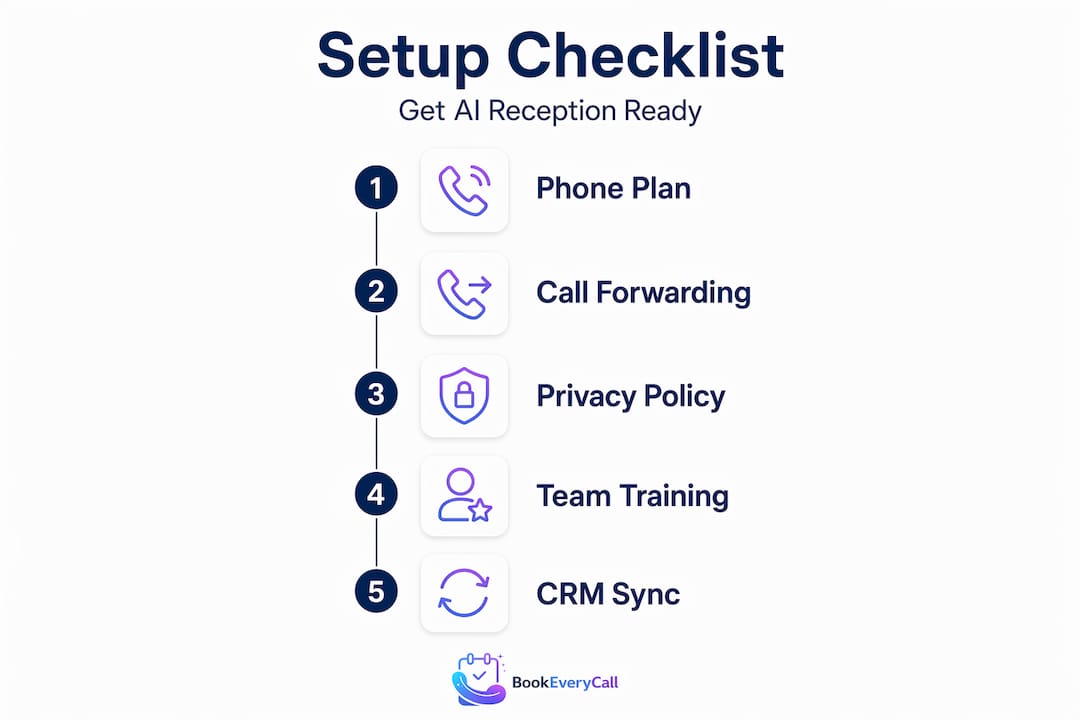
Here is a checklist of what you need before setup:
- Active business phone number (landline, mobile, or VoIP)
- Carrier confirmation that conditional call forwarding is enabled on your plan
- A chosen AI receptionist service with an assigned virtual number
- A CRM system to receive call data (e.g. HighLevel, HubSpot, or Zoho)
- An automation platform such as Make.com for connecting systems without coding
- A basic understanding of your current call volume and peak hours
Compliance requirements you cannot ignore
From 10 December 2026, automated decision-making transparency becomes a legal obligation for Australian APP entities. If your AI receptionist qualifies callers, routes them based on their responses, or makes any decision that affects how they are treated, your privacy policy must disclose the types of personal data used and the nature of the decisions being made.
This is not a distant concern. Businesses need to assess their ADM systems now and plan their privacy policy updates well before the deadline. The OAIC’s guidance makes clear that the focus is on decisions that meaningfully affect individuals’ rights, so a simple call-answering script is lower risk than a system that scores leads and decides who gets a callback.
Organisational readiness
Tell your staff before you go live. An AI receptionist that answers calls your team does not know about creates confusion and duplicated follow-up. A short briefing on what the AI handles, what it escalates, and how call data flows into your CRM is all it takes.
Pro Tip: Run a one-week trial period where you monitor every forwarded call manually. This lets you catch greeting timing issues, awkward silences, and any calls the AI mishandles before they affect your reputation.
| Tool | Purpose | Cost range (AUD) |
|---|---|---|
| AI receptionist service | Answers, qualifies, and books calls | $150 to $600/month |
| Make.com | Connects AI data to CRM | Free to $30/month |
| CRM platform | Stores and manages lead data | $0 to $200/month |
| VoIP number (optional) | Dedicated line for AI routing | $10 to $30/month |
Setting up call forwarding and initial configuration
The actual setup of an automated receptionist for small business is where most owners get stuck, usually because they underestimate how carrier-specific the process is. Conditional call forwarding after 3 to 4 rings is the recommended approach. It keeps a human available for the first few rings and only passes the call to the AI if no one picks up.
Here is how to set it up correctly:
Contact your carrier. Ask specifically for “no-answer conditional call forwarding” and confirm the activation code for your plan. Do not assume the standard *61 code applies. Telstra, Optus, and Vodafone each have variations, and some business plans require a support ticket rather than a self-service code.
Decide on your ring count. Three to four rings is the sweet spot. Fewer than three feels abrupt to callers. More than five and they assume no one is there and hang up before the AI picks up.
Get your AI receptionist’s virtual number. Once you have signed up with your chosen service, you will receive a dedicated number. This is the number your carrier forwards unanswered calls to.
Activate forwarding. Enter the forwarding code on your business phone, substituting the virtual number provided by your AI service. Confirm activation with your carrier if the self-service code does not work as expected.
Test immediately. Call your business number from a mobile on a different carrier. Listen for the ring count, the transition to the AI, and the greeting. Silence between the forwarding handoff and the AI greeting is the most common problem and is usually caused by a network latency issue or an incorrectly configured greeting delay.
Test across devices and carriers. Carrier-specific codes and ring counts affect caller experience differently depending on the network. A call from a Telstra mobile may behave differently than one from an Optus landline.
Pro Tip: Ask a friend or family member to call your number without telling them what to expect. Their uncoached reaction to the AI greeting is the most honest feedback you will get on whether the experience feels natural or robotic.
The setup typically takes one afternoon, and the weekly time reclaimed from managing call overflow alone is around 3 to 5 hours. That is time you get back immediately.
Connecting your AI receptionist to your CRM
Answering calls is only half the job. The real value of an AI call handling solution comes from what happens after the call ends. Without integration, your AI receptionist captures caller information that then sits in a separate system, waiting for someone to manually transfer it into your CRM. That manual step is where leads get lost.
Many small businesses lose lead data after calls because AI call data never makes it into the CRM. The fix is a webhook-based automation, and you do not need a developer to build it.
Here is the workflow:
- Set up a webhook in Make.com. Make.com acts as the connector between your AI receptionist and your CRM. Create a new scenario in Make.com and add a webhook as the trigger. Your AI receptionist service will send call data to this webhook URL after every completed call.
- Configure your AI receptionist to send data. In your AI service’s settings, find the webhook or integration section and paste in the Make.com webhook URL. Specify which fields to send: caller name, phone number, enquiry type, and any qualifying answers the AI collected.
- Add a duplicate check. Before creating a new contact in your CRM, add a search step in Make.com that looks for an existing contact with the same phone number. This prevents your CRM from filling up with duplicate records.
- Create or update the contact. If no duplicate exists, Make.com creates a new contact in your CRM. If one does, it updates the existing record with the new call details and tags the contact with the enquiry type.
- Trigger a follow-up action. Add a final step that either sends a notification to your team, creates a task, or triggers an automated follow-up SMS or email to the caller.
This automation typically takes around 25 minutes to set up and reclaims 2 to 4 hours of admin work each week. No coding required.
Pro Tip: Always include a “call notes” field in your webhook payload. When your AI receptionist summarises the call, that summary passed directly into the CRM contact record gives your team instant context before they follow up, cutting call prep time significantly.
Webhooks provide a simple method to connect AI call data to CRM platforms without native integrations. For small businesses without a dedicated IT person, this approach is the most practical path to a fully automated lead management workflow.
How AI receptionists help small businesses across Australia
The benefits of AI receptionists are not abstract. They play out differently depending on where your business is and what industry you operate in. Here is how the picture looks across Australia’s major cities.
- Sydney. Trade businesses in the western suburbs, from plumbers in Parramatta to electricians in Penrith, routinely miss calls while on-site. An AI receptionist answers, qualifies the job type, and books a time directly into the tradie’s calendar. The best AI answering service for plumbers in Sydney is one that knows the difference between an emergency call-out and a routine quote request, and routes accordingly.
- Melbourne. Professional services firms in the CBD and inner suburbs, including accountants, physios, and legal practices, deal with high call volumes during business hours and near-zero coverage after 5pm. An AI phone answering service fills that gap without the cost of a part-time receptionist.
- Brisbane. The construction and renovation sector is growing fast in South East Queensland. Builders and concreters who are on-site all day miss enquiries that go straight to a competitor. A digital receptionist for startups and growing trade businesses captures those leads 24/7.
- Perth. The time zone difference means Perth businesses often receive calls from eastern-state clients outside of local business hours. An after-hours AI receptionist handles those calls professionally and books appointments without anyone needing to be at a desk.
- Adelaide. Small retail and hospitality businesses in the CBD and suburbs benefit from an affordable AI receptionist service that handles booking enquiries and FAQs, freeing up staff to focus on in-person customers.
Across all five cities, the common thread is the same: calls that used to go unanswered now get answered, qualified, and converted. The revenue recovered from missed calls can be substantial, with some businesses recapturing tens of thousands of dollars annually.
Testing, monitoring, and staying compliant
Going live is not the finish line. The businesses that get the most from their AI voice receptionist are the ones that treat it as an ongoing system to monitor and improve, not a set-and-forget tool.
Start with these testing and monitoring habits:
- Weekly call audits. Listen to a sample of recorded calls each week. Check that the AI is capturing the right information, handling objections naturally, and escalating calls it cannot resolve.
- Track your key metrics. Monitor call pick-up rate, lead capture rate, and bookings generated. If pick-up rate drops, it usually signals a forwarding issue. If lead capture falls, the AI’s qualifying questions may need updating.
- Review your greeting regularly. Seasonal changes, new services, and updated business hours all require greeting updates. A greeting that references your old hours or a discontinued service damages trust immediately.
- Check your privacy policy. If your AI receptionist qualifies callers or makes routing decisions based on their responses, your privacy policy needs to reflect this. Australian privacy law reforms require businesses to start planning now to meet December 2026 obligations.
Pro Tip: Add a short line to your AI receptionist’s greeting that tells callers the call may be handled by an automated system. This single sentence satisfies a key transparency expectation and reduces complaints significantly.
Compliance with Australia’s automated decision-making transparency laws is not just a legal checkbox. It is a signal to your customers that you handle their data with care, and that builds the kind of trust that keeps them calling you instead of a competitor.
The OAIC’s guidance is clear that significant automated decisions affecting individuals’ rights trigger specific disclosure requirements. Review your AI receptionist’s decision logic with this in mind and update your privacy policy accordingly before December 2026.
My take on getting this right
I’ve watched a lot of small business owners approach AI receptionists the same way they approach a new coffee machine: plug it in, press a button, and expect it to work perfectly. The ones who get burned are almost always the ones who skipped the carrier coordination step or never connected the AI to their CRM.
What I’ve found is that the technology itself is rarely the problem. The problems are almost always operational. A forwarding code that was never confirmed with the carrier. A CRM that receives call data but has no one assigned to act on it. A greeting that was written in five minutes and never tested on a real caller.
The compliance piece is where I think most Australian small business owners are genuinely underprepared. The December 2026 automated decision-making transparency deadline sounds distant, but privacy policy updates take time to draft, review, and publish. If your AI receptionist qualifies leads or routes calls based on caller responses, you are likely operating an ADM system under the new rules. Starting that review now is not overcautious. It is just good business practice.
The businesses I’ve seen get the most out of an AI voice receptionist are the ones that treat it as a front-of-house team member rather than a piece of software. They update its scripts when their services change. They review its calls the way they would review a new employee’s performance. And they connect it properly to the rest of their business systems so nothing falls through the cracks.
The automation is not the goal. Capturing every lead and converting it into a booked job is the goal. The AI is just the tool that makes that possible at scale.
— Chay
How Bookeverycall helps you capture every call
Bookeverycall is a fully managed AI voice receptionist service built specifically for Australian small businesses. It answers calls 24/7, qualifies enquiries, and books jobs directly into your calendar, without you needing to lift a finger. Whether you run a trade business in Brisbane, a medical practice in Melbourne, or a real estate agency in Perth, Bookeverycall handles the calls you cannot.
The service works with your existing business number, requires no disruptive hardware changes, and includes setup support so your forwarding and CRM integration are configured correctly from day one. For businesses losing revenue to missed after-hours calls, the complete guide to AI receptionists covers exactly what Bookeverycall offers across industries including tradies, allied health, and property management.
Ready to stop losing jobs to unanswered calls? Visit bookeverycall.com or book a strategy call to see how much revenue your business could be recovering.
FAQ
What is an AI voice receptionist for small business?
An AI voice receptionist is an automated system that answers incoming calls, engages callers with natural speech, collects information, and books appointments, all without human involvement. It works 24/7 and forwards complex calls to a real person when needed.
How much does an AI phone answering service cost in Australia?
Pricing for AI receptionist services in Australia typically ranges from $150 to $600 per month depending on call volume and features. This is significantly less than the cost of a part-time human receptionist, which averages $25 to $35 per hour.
Is an AI receptionist compliant with Australian privacy law?
It can be, provided you update your privacy policy to disclose how personal data is collected and used. From December 2026, businesses using automated decision-making must meet new transparency requirements under Australian privacy law reforms.
How do I set up call forwarding to an AI receptionist in Australia?
Contact your carrier to enable conditional no-answer call forwarding on your plan, confirm the activation code specific to your telco, and enter your AI receptionist’s virtual number as the forwarding destination. Test across multiple devices and carriers before going live.
Can an AI receptionist integrate with my existing CRM?
Yes. Using a platform like Make.com, you can connect your AI receptionist to most CRM systems including HighLevel, HubSpot, and Zoho without any coding. Setup typically takes around 25 minutes and automates contact creation, duplicate checking, and follow-up task generation.
Permalink