
TL;DR:
- AI calendar sync relies on combining webhook push notifications and incremental sync tokens to maintain accurate, conflict-free scheduling across platforms. Proper implementation, including renewal management and deduplication, is essential to prevent double bookings and operational errors. Australian businesses benefit from reliable AI scheduling by avoiding lost revenue due to missed calls and appointment conflicts.
AI calendar sync is defined as the combination of webhook push notifications and incremental sync tokens to keep scheduling data accurate, current, and conflict-free across multiple platforms. This technology sits at the core of every modern AI scheduling tool, from Google Calendar API integrations to Microsoft Graph connections. Understanding how calendar sync with AI works matters for any Australian business owner who wants to stop losing jobs to missed calls and double bookings. The mechanism is more precise than most people realise, and the efficiency gains are significant.
How calendar sync with AI works: push and incremental sync
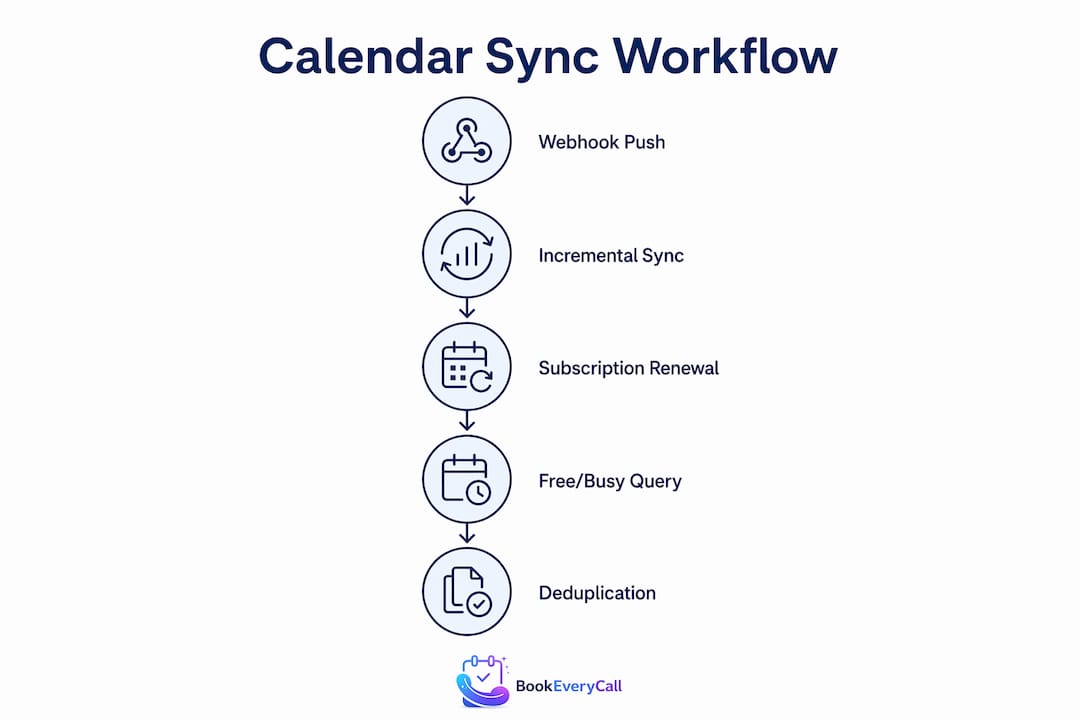
Two mechanisms drive every reliable AI calendar integration. The first is push notifications, commonly called webhooks. The second is incremental polling sync. Neither works well alone. Together, they create what engineers call eventual consistency: your calendar data is always moving toward accuracy, even when one mechanism temporarily fails.

Push notifications: speed without guarantees
A webhook fires the moment a calendar event changes. Google Calendar API and Microsoft Graph both support this architecture. When a client books an appointment, the webhook delivers a signal to your AI system within seconds, triggering an immediate update. That speed matters enormously for businesses handling back-to-back bookings across multiple staff members.
The catch is that webhooks are not perfectly reliable. Network interruptions, server timeouts, and subscription expiry all cause missed signals. A webhook that fires but receives no acknowledgement within a set window is simply dropped. This is not a rare edge case. Production systems experience it regularly.
Pro Tip: Never build a calendar sync system on webhooks alone. Treat push notifications as your speed layer and always pair them with a polling fallback to catch what webhooks miss.
Incremental sync: the reliability safety net
Incremental sync solves the reliability problem. Instead of re-downloading every calendar event on each poll, the system uses a sync token as a bookmark. The token records exactly where the last successful sync ended. On the next poll, the API returns only events that changed since that token was issued.
The efficiency gain is substantial. Incremental sync tokens reduce API load by more than 99% compared to full calendar downloads. Without tokens, a busy professional’s calendar might force the system to process thousands of events on every cycle. With tokens, the same poll fetches one to five changed events. That difference determines whether your AI scheduling tool runs fast or grinds to a halt under load.
Subscription renewal: the maintenance nobody talks about
Both Google Calendar API webhooks and Microsoft Graph subscriptions expire on a fixed schedule. Google webhook channels expire after seven days and require renewal to maintain continuous sync. Microsoft Graph subscriptions expire even faster and demand a validation handshake within ten seconds of the renewal request. Miss that window and your sync goes silent without any error message.
Production-grade AI calendar systems run background renewal processes that handle this automatically. If you are evaluating an AI scheduling tool for your business, ask the vendor directly how they handle webhook subscription renewal. A vague answer is a red flag.
How does AI prevent double-bookings and conflicts?
Double-booking is the most damaging scheduling failure a service business can experience. A tradie who shows up to two jobs at the same time loses one client permanently. AI calendar integration prevents this through two specific mechanisms: free/busy queries and deduplication.
Free/busy queries before every booking
Before any AI scheduling tool creates a new event, it queries the free/busy status of every relevant calendar. Google Calendar’s API provides dedicated tools for this, including find_free_time and query_free_busy, which check availability across multiple calendars simultaneously. The AI does not guess. It reads the actual availability data and only proceeds with a booking when a genuine gap exists.
This matters for businesses with multiple staff members or service vehicles. A plumbing company in Brisbane with four technicians needs the AI to check four separate calendars before confirming any job. A system that only checks one calendar will create conflicts across the others.
Deduplication: stopping sync loops before they start
Two-way calendar sync creates a specific risk called a sync loop. When event A is created in Calendar 1 and copied to Calendar 2, the system must recognise that the copy in Calendar 2 is not a new original event. Without deduplication, the system copies it back to Calendar 1, then back to Calendar 2, and so on indefinitely.
AI sync systems prevent this by tracking event identifiers and labelling each event as either an original or a synced copy. The system refuses to sync a synced copy back to its source. Production systems go further, maintaining state tables that map source to destination event IDs for every booking, reschedule, and cancellation. This mapping is what makes correct update propagation possible when a client changes their appointment time.
- Free/busy checks run before event creation, not after.
- Deduplication uses event ID metadata, not event titles or times.
- State tables track the full lifecycle of each event across all connected calendars.
- Idempotency rules mean the same booking instruction produces the same result, even if sent twice.
- Cancellation propagation relies on the same ID mapping used for creation.
Pro Tip: When testing any AI scheduling tool, create a booking, then immediately try to book the same slot from a different device. If the system allows it, the free/busy check is not working correctly.
Google calendar vs microsoft 365 vs apple calendar: how do they compare?
The three dominant calendar platforms each handle AI sync differently. Choosing the wrong platform for your business, or failing to understand its limitations, creates operational gaps that cost you bookings.
| Platform | Sync Method | Webhook Expiry | Key Limitation |
|---|---|---|---|
| Google Calendar | Sync tokens plus push channels | 7 days, requires renewal | Channel renewal must be automated |
| Microsoft 365 | Graph API webhooks | Days (varies), 10-second validation | Renewal handshakes are time-critical |
| Apple Calendar | CalDAV protocol | No native webhooks | Tasks do not sync; events only |
Google calendar: the most mature AI integration
Google Calendar uses sync tokens for incremental updates and push channels for real-time notifications. Tools like Nango provide pre-built integration layers that handle token management and renewal automatically, making Google Calendar the most accessible platform for AI scheduling integrations. Most Australian AI scheduling tools treat Google Calendar as their primary integration target.
Microsoft 365: powerful but demanding
Microsoft Graph delivers strong enterprise features, but its webhook subscription lifecycle is the most demanding to maintain. Subscriptions expire quickly, and the ten-second validation window for renewal leaves no room for slow server responses. Businesses running Microsoft 365 need an AI scheduling tool with a proven Graph integration, not a basic connector built on top of the standard API.
Apple calendar: events only
Apple Calendar uses CalDAV, an open protocol that supports event syncing reliably. The significant limitation is tasks. iCloud’s CalDAV implementation does not sync tasks from the Reminders app, only calendar events. For businesses that manage follow-up tasks alongside appointments, this gap requires a workaround. Most multi-platform AI tools handle this by treating Apple Calendar as an event-only source and routing task management through a separate system.
How australian businesses benefit from AI calendar sync
The technical architecture described above translates into direct operational and financial outcomes for Australian businesses. The connection between sync reliability and revenue is straightforward: a missed booking is a missed payment.
Missed calls cost Australian small businesses thousands of dollars annually in lost appointments and double bookings. That figure compounds quickly for trade businesses, allied health clinics, and real estate agencies where each appointment represents a fixed revenue amount. Reliable AI calendar sync removes the human error that causes most of those losses.
Real-world use cases across australian industries
- Tradies in Sydney and Melbourne: An electrician running three crews needs real-time calendar sync to prevent two crews being dispatched to the same job. AI scheduling tools with emergency job booking capabilities rely entirely on accurate sync to handle urgent callouts without creating conflicts.
- Real estate agents in Brisbane and Perth: Property viewings require precise scheduling across agent calendars and vendor availability. AI tools that handle property viewing bookings use free/busy queries to confirm genuine availability before confirming any inspection time with a prospective buyer.
- Allied health clinics in Adelaide: A physiotherapy clinic with five practitioners needs every practitioner’s calendar synced in real time. A patient booking online at 11 pm must see accurate availability, not a snapshot from three hours earlier.
- HVAC businesses across regional Australia: After-hours calls are common in the HVAC sector. An AI voice receptionist that books jobs directly into a synced calendar means a technician wakes up to a confirmed schedule, not a voicemail backlog.
Bookeverycall operates as a fully managed AI receptionist that connects directly to your calendar. When a call comes in at 2 am, the AI qualifies the enquiry, checks real-time availability through calendar sync, and books the job without any human involvement. The AI appointment scheduling capability is built on the same webhook and incremental sync architecture described throughout this article.
Webhook-based sync systems complete a full sync round-trip in approximately four seconds. That speed means a booking confirmed by your AI receptionist at 2:04 am is visible to your technician by 2:04 am. There is no lag, no stale data, and no risk of a second caller booking the same slot.
Key takeaways
AI calendar sync works reliably only when webhook push notifications and incremental sync tokens operate together, with deduplication and free/busy checks preventing conflicts at every booking step.
| Point | Details |
|---|---|
| Dual sync mechanism | Webhooks deliver speed; incremental tokens deliver reliability. Both are required. |
| API efficiency | Sync tokens reduce API load by more than 99% compared to full calendar downloads. |
| Conflict prevention | Free/busy queries check all connected calendars before any event is created. |
| Deduplication is non-negotiable | Event ID tracking stops sync loops and duplicate bookings in two-way integrations. |
| Platform differences matter | Apple Calendar syncs events only; Google and Microsoft require webhook renewal management. |
Why most businesses get calendar sync wrong
I have spent years watching businesses adopt AI scheduling tools and then wonder why they still get double bookings. The answer is almost always the same: they chose a tool that relies on webhooks alone, without a polling fallback, and without proper deduplication logic.
The uncomfortable truth is that most operational risk in AI scheduling does not come from the AI model itself. It comes from the guardrails around it: the free/busy checks, the idempotent update rules, the state tables that track event IDs. When those guardrails are missing or poorly implemented, the AI confidently books appointments into slots that are already taken.
For Australian businesses, this is not a theoretical problem. A tradie in Perth who loses a $2,000 job because two bookings landed in the same slot is not going to care about the elegance of the underlying API architecture. They care about the outcome. And the outcome depends entirely on whether the sync system was built correctly.
My advice is specific. Before committing to any AI scheduling tool, ask three questions. First, how does the system handle webhook expiry? Second, does it use incremental sync tokens or full calendar downloads? Third, how does it prevent sync loops in two-way integrations? If the vendor cannot answer all three clearly, keep looking.
The Australian market is moving fast. AI voice receptionists that book directly into synced calendars are no longer a luxury for large businesses. They are becoming the baseline expectation for any trade, health, or property business that wants to compete. The businesses that understand the technology behind the tools will make better purchasing decisions and get better results.
— Chay
How Bookeverycall connects AI sync to real revenue
Bookeverycall is built for Australian businesses that cannot afford to miss a call or a booking. The platform functions as a fully managed AI voice receptionist that answers every call, qualifies the enquiry, and books the job directly into your calendar using the sync architecture described in this article.
Whether you run a trade business in Sydney, a property management agency in Melbourne, or an allied health clinic in Brisbane, the result is the same: no missed calls, no double bookings, and a calendar that updates in real time. Bookeverycall’s AI voice receptionist for small business handles the entire booking workflow 24 hours a day, seven days a week. Book a strategy call at bookeverycall.com to see how it works for your specific operation.
FAQ
What is AI calendar sync?
AI calendar sync is the process of using webhook push notifications and incremental sync tokens to keep calendar data accurate and current across multiple platforms in near real time.
How does AI prevent double-bookings?
AI scheduling tools query the free/busy status of all connected calendars before creating any event, using API tools like Google Calendar’s query_free_busy to confirm genuine availability first.
Why do webhook subscriptions expire?
Google Calendar webhook channels expire after seven days and Microsoft Graph subscriptions expire within days. Both require automated renewal processes to maintain continuous sync without interruption.
Does apple calendar work with AI scheduling tools?
Apple Calendar supports event syncing via CalDAV, but tasks from the Reminders app do not sync through this protocol. AI tools treat Apple Calendar as an event-only source.
How much do missed bookings cost australian businesses?
Missed calls and double bookings cost Australian small businesses thousands of dollars annually in lost appointments. Bookeverycall reports that recurring missed calls can represent up to $312,000 in lost revenue per year for some businesses.